printervention.app: backstory and how it works
Do you have an old USB printer that your computer can’t print to? If so, this is the web app for you. And this is how it came about.
I got an old photo printer
Our story begins as I unexpectedly acquire a Canon SELPHY photo printer. I’d bought a new 3D printer, and I asked my friend Mark if he’d like the old one. He said yes, and asked if I’d like a photo printer in return. He’d picked up a spare one on eBay, with paper and ink, for less than the value of the paper and ink alone!
I also said yes, excited by a new gadget the whole family might enjoy. Then I discovered why these old printers go for so little. Macs haven’t supported them for quite some time, and Windows hasn’t either. Mark uses Linux: he hadn’t had this problem.
Happily, I already have a Manjaro box on my desk: a tiny Lenovo ThinkCenter I use mainly for testing. As it happens, these also go for a song on eBay.
Linux can share it over AirPrint
I installed CUPS and Gutenprint on my Manjaro machine, and it printed to the SELPHY beautifully. I set up Avahi to share it over AirPrint, and the whole family could print from their Macs and iPhones.
We were printing photos like it’s 1999: real photos you can touch! Except -- unlike in 1999 -- it’s easy, and instantaneous, and you can print only the good ones, and you can crop and fix the exposure first. You also get to see the magic of CMY printing unfold right in front of you, because these printers pass the paper through three times, laying down first the yellow, then the magenta, and finally the cyan plane.
A happy ending! But this is only the middle of the story. Because then I thought: my parents would like one of these. They could print pictures of the grandkids. Perhaps I could set them up a Raspberry Pi as a print server? But that would make it not so cheap. And anyway, I’m not convinced they’d go for the extra plugs and wires.
Not everyone runs Linux
Surely -- I thought -- surely it must be possible to non-nerdify this thing using software alone. And wouldn’t that be great? Let’s save a million printers from landfill.
So I paid £18 for a month of Claude Code and started coding. (Modern LLMs are just incredible: if computers are bicycles for the mind, per Steve Jobs, then Claude Code is a private jet.)
Claude and I began work on a native Mac app that would discreetly run a bare-bones Linux VM. It would use Virtualization.framework, forward USB traffic, and advertise the printer over mDNS. But it probably wouldn’t be allowed in the App Store. And even if it was, only Mac users would see any benefit.
But nearly everyone can use a web app
Then I remembered (thanks to the family micro:bit, currently the brains of a Bluetooth-controlled Meccano bus), that Chrome has WebUSB. What if I could make this a web app? Then it could work anywhere -- no installation required. Plus it would be doing cool things with JavaScript, which I always enjoy. :)
So I swapped Xcode for VS Code and started again. A short while later, it was clear that this was going to work, and I registered printerface.app and printervention.app (Claude preferred the former; my wife preferred the latter; my wife won).
How does it work?
How the web app works
The core of this app is the amazing v86, which emulates an x86 CPU -- and the whole machine around it -- in a browser. It compiles machine code to WebAssembly modules at runtime, which puts the whole arrangement just the right side of intolerably slow. I make it so this v86 machine runs Alpine Linux with CUPS, Gutenprint and supporting packages.
The browser connects to your printer over WebUSB, retrieving its make and model. It looks for the Gutenprint driver name that’s the closest match using trigrams, and sends an lpadmin command over the emulated keyboard to install it.
Then, to print a file, it’s uploaded into the emulated machine and an lp print command is sent. And, as if by magic, the raw binary print data produced in the emulated machine ends up at your printer.
Of course, it’s that very last step that’s the interesting one. It went through several iterations.
Bridging CUPS and WebUSB
First, I used a custom CUPS backend. This was actually Gemini’s idea. The backend was a simple shell script, receiving raw print data and sending it byte-by-byte back to the browser over a v86 TTY. There, the bytes were reassembled and passed to the printer via bulk USB transferOut calls.
The beautiful thing about this was: it worked! I was initially a bit sceptical, but printing really can be achieved simply by pushing a one-way, fire-and-forget, binary data stream at your device. Here’s the first photo I got Chrome to print from the SELPHY: one of the family cats in a cardboard box.
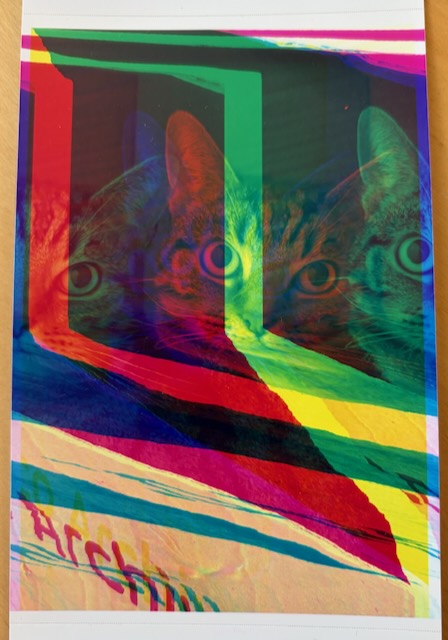
It’s all wrong, of course, but the displacement of the CMY planes makes it colourful, abstract art. It turns out this is what happens when you push separated Y-M-C print data over a TTY that expects text, and thus does funny things with newlines and control characters. The effect went away as soon as I added an stty raw command to the backend script.
The second iteration was an alternative, and probably more efficient, CUPS backend implementation. This one transferred data in much larger chunks using v86’s 9p filesystem. This one also mangled its first photos in interesting (this time stripey) ways. The learning here? Always sync a file on the Linux side before trying to read it back from JavaScript.
The key drawback of both these approaches was that the data flow was all one-way. The CP-400 has no display, so if things go wrong you can’t immediately tell whether it’s a paper jam, an empty ink cartridge, or whatever else, unless the computer can relay that message to you. And since the computer never hears a peep from the printer in this setup, it obviously can’t do that.
Making the bridge two-way
One other reason I had in mind to try for data flow back from the browser to the emulated Linux machine was an old Canon USB scanner that’s been sitting on my shelves for the last ten years. I was thinking it would be nice to try a similar weird trick to resuscitate old scanners as well as old printers.
In any case, I gave Claude a fresh cup of really hot tea and asked it how to go about bidirectionally bridging the emulated Linux machine’s USB and WebUSB.
To my mind, Claude really aced this. It began by suggesting two things I’d never heard of: USB/IP and tcpip.js.
- USB/IP runs on the Linux machine. It packages up outgoing USB data into TCP packets, and unwraps USB data out of incoming TCP packets. With USB/IP working, there’s no longer any need for a custom CUPS backend: as far as CUPS knows, it’s just connected to an ordinary USB printer over ordinary USB.
- tcpip.js runs on the JavaScript side, mainly by compiling lwIP to WebAssembly. You see, our v86 machine has an emulated network card, but what emerges from that into the JavaScript environment is raw Ethernet frames. The browser exposes no network stack to turn this L2 Ethernet traffic back into L4 TCP/IP traffic, of course. This is what tcpip.js does for us.
Having wired up these two things, Claude proceeded nonchalantly to one-shot a 400-line USB/IP-to-WebUSB bridge. Now printing not only worked, but CUPS knew exactly what was going on at every stage.
At this point I took a little diversion to prototype a scanning app using SANE, and Claude also made a small but critical fix to tcpip.js to get that working too. (I’ve registered yes-we-scan.app: you can expect that to be available pretty soon).
Further tweaks
But back on printervention.app, I had two remaining niggles.
First, I couldn’t seem to stop CUPS squashing my photos to fit the SELPHY’s 6 x 4" postcard paper size (whatever fit or fill settings I asked for). To solve that issue, I now embed any JPEG in a hand-rolled PDF file that matches the printer’s paper size.
I had some CoffeeScript to do this lying around from an ancient project (printing CD covers) that I never got round to releasing. Claude helped add some code to deal with EXIF orientation data, and also to pass an ICC profile from the JPEG over into the PDF image’s metadata for better colour reproduction.
Second, most of my pictures are in Apple Photos, or lifted via AirDrop from my iPhone. That means most of them are stored as HEICs. I asked Claude to whip up a sensible conversion pipeline -- that wouldn’t ever try to keep all the uncompressed image data in memory at once -- and it duly obliged, gluing together libheif-js and wasm-mozjpeg, while making sure to pass through the ICC profile once again.
Finally, I added some affiliate links to consumables (knowing that somebody is printing right now to a specific printer seems like a good lead!), and some very basic telemetry, sending basic details of sessions, printers and print jobs to be saved to a Neon Postgres DB.
So that’s my printervention. I hope it’s useful to you. I’ve bought up a (very small) stock of SELPHY printers in the ludicrous hope that releasing it will cause them to quadruple in price overnight. :)
What’s next
The app has only been tested on these few photo printers, but I have some hope that it will work for a range of other Gutenprint-supported models, just as long as you don’t try to print anything too enormous in one go. If you give it a try, please do get in touch. Undoubtedly improvements can be made, including adding extra PPD packages such as brlaser and splix.
I must apologise that I haven’t so far open-sourced any part of this that I don’t have to. Mainly that’s because I think this would be an awesomely sticky web property for a printer consumables firm to integrate with their sales site. And I’d much prefer it if they paid me to white-label it for them, rather than just forking a repo and getting it all for free.
George MacKerron
April 2026
Update, May 2026: you can now drag in a .zip file and any JPEG, HEIC, PNG or PDF files inside it will be decompressed and used. This makes the app easier to use with iCloud Photo, which saves downloads as .zip files (at least for live photos, which include a short video too).